


SkyportHome
4.6625.00 Reviews
App Specs
- Version
- 3.7
- Updated On
- License
- Free
- Downloads
- 100,000+
- Developer
- Daikin Comfort Technologies North America, Inc.
- Categories
- House & Home
- Platform
- Android
Screenshots
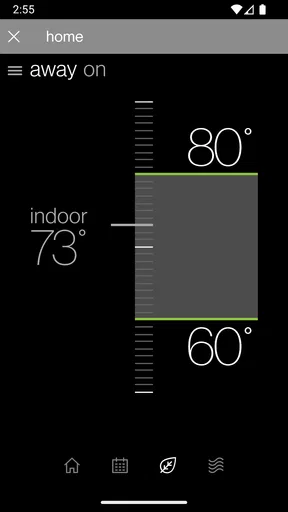
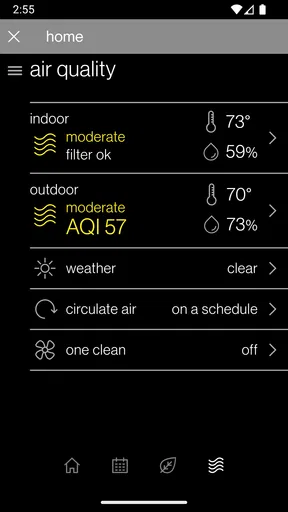
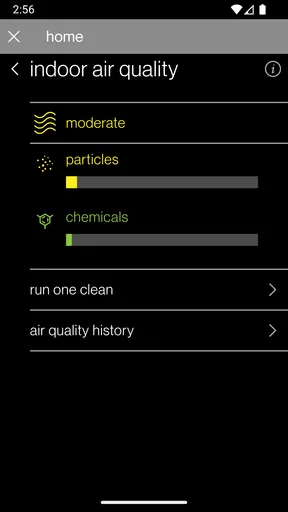
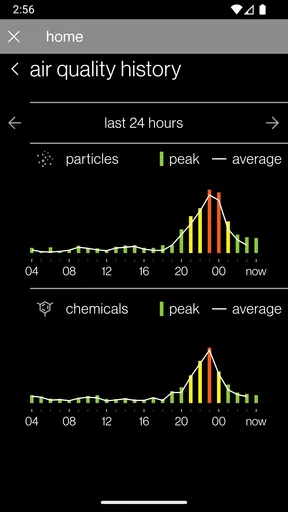
 Analysis by AppCompare
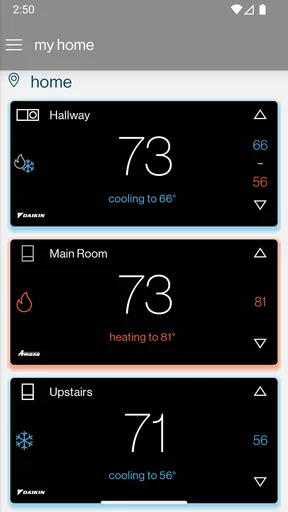
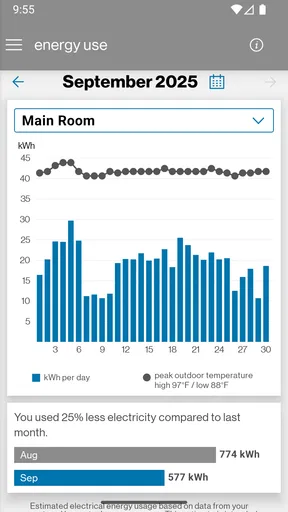
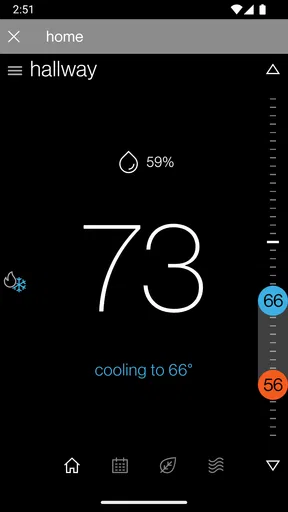
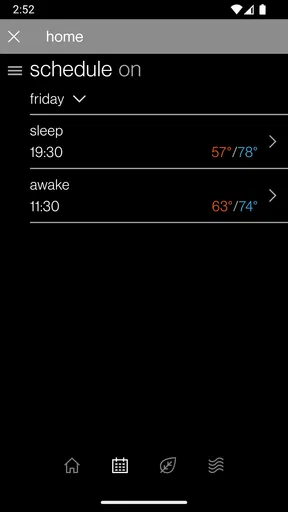
When several people share a home, heating and cooling are among the few household settings that everyone notices when they are wrong. I find a phone control useful not because it turns a house into a futuristic command center, but because it can make a small adjustment possible without walking over to the thermostat. SkyportHome is aimed at that practical corner of home life: it is a free House & Home app from Daikin Comfort Technologies North America, Inc., for managing compatible Daikin, Amana, and Goodman heating and cooling systems remotely.
That focus matters when deciding whether it belongs on your phone. It is not a general smart-home hub, and I would not choose it expecting to coordinate lighting, locks, cameras, and entertainment in one place. Its appeal is narrower: people who use a supported heating or cooling system and want a convenient way to check or adjust it. In that situation, having a control available while away can be genuinely handy; if you do not have a compatible system, the app is unlikely to offer much value.
A shared home, one practical control
A realistic use is a household where one person leaves early and another stays home. The person who has gone out can check the system or make an adjustment rather than calling someone in the house to find the thermostat. The person at home can still use the physical control as usual. I like this as a modest convenience, not a reason to hand every household member a phone or to treat remote access as a replacement for agreeing on a comfortable setting.
For a shared device, the useful question is less “Can everyone control everything?” and more “Who should have access, and how will we avoid undoing one another’s changes?” I would settle those expectations before connecting a household system: agree on who handles routine adjustments, and let other occupants know when a remote change might affect their comfort. This is especially helpful in homes where people keep different schedules or have different preferences.
Setup depends on the system you already have
The first decision is compatibility, not the app’s appearance. SkyportHome is intended for Daikin, Amana, and Goodman heating and cooling equipment, so it is not a universal controller for every thermostat or home device. Before relying on it, check the make and model of the installed system and confirm that it can be used with the app. If you are moving into a home or do not know what equipment is installed, identifying the control system first can save time and prevent a frustrating download-and-discover process.
Account setup also deserves a little thought in a shared household. I would use an account arrangement the household can maintain if the person who first configures the app moves out, changes phones, or no longer handles home equipment. That is a practical planning point rather than a claim about special family profiles: SkyportHome should not be assumed to provide household roles or separate permissions. If several people need access, check how access is actually managed during setup and decide who is responsible for keeping it usable.
One non-obvious trade-off is that remote control adds convenience but also makes coordination more important. A change made from outside the home may surprise someone who is there, while a setting changed at the wall may not match what another person expects to see on a phone. I would treat the app as another way to reach the same household control, then communicate changes that affect other occupants instead of assuming everyone has the same view or routine.
Worth Reading Before You Choose

EA SPORTS FC Mobile 26 Is a Bigger Football Game, but It Takes Time

Flipboard Shows What News Apps Must Do Beyond the Feed

Switching to Android Auto Means Rethinking Your Driving Routine

Google Calendar Makes a Crowded Week Easier to Manage

Ludo King Makes the Most of the Minutes Between Plans

Baby Panda World Brings Quick Play to Modern Phones, but Its Game Library Feels Busy
What it is—and what it is not
In the usual home-control category, many apps try to bring unrelated devices under one roof. SkyportHome is better understood as a focused companion for compatible heating and cooling equipment. That specialization is useful if you want a straightforward route to the system you already own; it is a limitation if your goal is a single dashboard for a wide mix of brands and devices. A manufacturer’s own control app is often the more sensible choice than a broad smart-home platform when the immediate job is simply managing that manufacturer’s equipment.
It also helps to distinguish remote adjustment from automatic household coordination. I would not choose the app on the assumption that it will create scenes involving lights and a television, monitor doors and windows, or provide security alerts. Those are different jobs from controlling heating and cooling. If you want those functions, a separate compatible service or device may be needed, and the best option depends on the equipment already in your home.
Useful habits for everyday use
For a household that shares access, I would start with one simple routine: check the current setting before changing it, especially when someone else is home. That small pause can prevent the familiar back-and-forth of one person lowering a setting while another raises it. It is also a good way to learn whether remote control genuinely helps your routine or merely adds another place to make the same decision.
Another useful approach is to keep the physical control familiar to everyone. A phone is convenient when you are away or not near the equipment, but it should not be the only method a household member knows how to use. If a visitor, child, or older relative needs a basic adjustment, it is sensible to explain the ordinary control rather than assume they should sign into an app. SkyportHome is most useful when it supplements a shared household routine, not when it makes everyday comfort dependent on one person’s account.
There is also a sensible boundary around remote use: make changes deliberately rather than repeatedly tapping a control when a response is not immediate. The original experience can include a slight delay when commands are carried out, so I would allow a moment to see what happened before trying again. Rapid repeated commands can make it harder to tell which adjustment took effect and may add confusion for someone else using the system.
Age, trust, and household expectations
The app has an Everyone content rating, but that does not mean every household member needs independent access. For many homes, an adult or the person responsible for the heating and cooling system can handle the account, while everyone else learns what changes are acceptable. That approach is about household trust and avoiding crossed signals, not a feature that assigns age-based permissions.
If a young person or guest uses a shared phone, I would keep the distinction clear between using the device and having authority to change the home’s settings. The app’s age rating is useful context for the app itself, but the equipment still affects everyone in the building. Agreeing on who may make remote changes is more helpful than treating the rating as a substitute for a household rule.
People who want detailed family controls, individual schedules for each occupant, or a broad set of smart-home integrations should compare other options before making this their main home app. Likewise, renters should check whether they are allowed to connect an app to the installed system and whether they will retain access when they move. Those are practical questions about the equipment and the household arrangement, not reasons to expect SkyportHome to manage tenancy or family administration.
Getting Started with SkyportHome
First off, downloading SkyportHome was a breeze. Whether you're an Android enthusiast or an iOS devotee, this app is readily available on both platforms. Once installed, I was greeted with a sleek and intuitive interface. The setup process was surprisingly straightforward, guiding me through each step to connect my various smart devices.
One thing I really appreciated was the app’s compatibility. It supports a wide range of devices, from smart thermostats to lighting systems. I found myself effortlessly syncing my gadgets, which made the whole experience that much more enjoyable.
Features That Stand Out
Now, let’s get into the nitty-gritty of what makes this app tick. One of the standout features is the ability to create customized scenes. Imagine setting up a "Movie Night" scene where your lights dim, the thermostat adjusts, and your TV turns on—all with a single tap. It’s like having a personal assistant who knows exactly what you need.
The app also offers real-time monitoring, which is perfect for keeping an eye on things while you’re away. I could check the status of my doors, windows, and even get alerts if something was amiss. This feature gave me peace of mind, knowing my home was secure even when I wasn’t there.
The User Experience
What I loved most about SkyportHome was its user-friendly design. The dashboard is organized and easy to navigate. Even if you’re not particularly tech-savvy, you’ll find it simple to use. The app also supports voice commands, which means you can control everything without lifting a finger. Talk about convenience!
Another plus is the customer support. I had a couple of questions during the setup, and their support team was quick to respond and incredibly helpful. It’s always reassuring to know that help is just a message away.
Areas for Improvement
While SkyportHome impressed me on many levels, there are a few areas where it could improve. For instance, the app occasionally experienced slight delays when executing commands. It wasn’t a deal-breaker, but it’s something the developers might want to address in future updates.
Additionally, while the app supports a wide range of devices, it would be even better if it expanded its compatibility to include more brands. This would make it truly universal and even more appealing to a broader audience.
Final Thoughts
In conclusion, SkyportHome is a powerful tool for anyone looking to modernize their living space. With its impressive array of features, user-friendly interface, and excellent customer support, it’s an app that genuinely delivers on its promises. While there are a few minor kinks to iron out, the overall experience is smooth and satisfying.
If you’re ready to take control of your home and make your life a little easier, I highly recommend giving SkyportHome a try. It’s like having your entire home at your fingertips, and who wouldn’t want that?
Who should choose it
SkyportHome makes the most sense for someone who already has compatible Daikin, Amana, or Goodman heating and cooling equipment and wants a phone-based way to manage it. It is free, has an Everyone content rating, and has built a substantial audience, with over 100,000 installs and an average rating of 4.4 from around 5,300 ratings. Those figures are useful context, but they do not tell you whether your particular system is compatible or whether remote control fits your household; checking the equipment remains the important first step.
The app is less compelling if your home relies on a different brand, if you only want to control equipment from the wall, or if you are looking for a single app to manage a collection of unrelated smart devices. In those cases, the manufacturer’s existing controls or a broader home platform may suit you better. I would not install it just because the idea of controlling a house by phone sounds appealing: the benefit depends on having the right heating and cooling system in place.
Questions worth settling before relying on it
Will it work when you are away? Remote management is central to the app’s purpose, so it is intended to let you reach a compatible system beyond the home. For dependable day-to-day use, I would still test the connection and controls before depending on them during a trip or a change in schedule. That also gives you a chance to learn how the system responds and how much delay is normal in your own setup.
Can several people in the household use it? The practical answer depends on the account and access arrangement available during setup, so I would verify that process rather than assume there are separate household profiles. Decide who will maintain access and how other people should request changes. That is particularly worthwhile when one person manages the app but several people live with the result.
Does it replace a general smart-home app? No: it is best treated as a focused control for supported heating and cooling systems, not a universal home dashboard. If your main goal is to manage lights, locks, cameras, or entertainment alongside climate, compare platforms based on the devices you own and keep SkyportHome’s narrower purpose in mind.
SkyportHome has been available since April 12, 2019, and its current version is 3.6.6, with a minimum operating-system requirement of 9. I would check that your phone meets that requirement before installing, then confirm the equipment and household access plan before making the app part of your routine. For the right home, that preparation makes a focused climate-control tool more useful than an ambitious but mismatched smart-home setup.
Pros
- User-friendly interface enhances navigation.
- Seamless integration with smart home devices.
- Real-time alerts for security updates.
- Customizable automation routines.
- Supports multiple user profiles.
Cons
- Limited compatibility with older devices.
- Occasional sync issues with certain brands.
- Subscription required for premium features.
- No offline mode available.
- Initial setup can be time-consuming.
FAQs for SkyportHome
What is SkyportHome and what does it offer?
SkyportHome is a comprehensive smart home management app designed for Android and iOS devices. It allows users to control and monitor various smart devices within their home from a single interface. Features include automation routines, real-time alerts, and remote access to connected devices, making it ideal for enhancing convenience and security.
Is SkyportHome compatible with all smart home devices?
SkyportHome supports a wide range of smart home devices, including lights, thermostats, cameras, and more. However, compatibility can vary, so it’s essential to check whether your specific devices are supported. The app frequently updates its compatibility list to include new devices, ensuring users have the latest options available.
How does SkyportHome ensure user security and privacy?
SkyportHome prioritizes user security by employing advanced encryption protocols to protect data during transmission and storage. The app requires two-factor authentication for access, ensuring that only authorized users can control connected devices. Additionally, it has a strict privacy policy, safeguarding user data against unauthorized access.
Is there a subscription fee for using SkyportHome?
SkyportHome offers a free version with basic features, but also provides a premium subscription for users seeking advanced functionalities. The premium version includes enhanced automation options, priority customer support, and additional device integrations. Users can choose the plan that best suits their needs, with the option to upgrade at any time.
Can I control my devices remotely with SkyportHome?
Yes, SkyportHome allows users to control their smart home devices remotely from anywhere with an internet connection. This feature is particularly useful for monitoring home security or adjusting settings while away. The app provides real-time updates and notifications, ensuring users are always informed about their home’s status.


